Can You Customise and Buy HYBEC Lights Online?
Written by
Sumith Tilokani
Published on
5th October 2026
SHARE
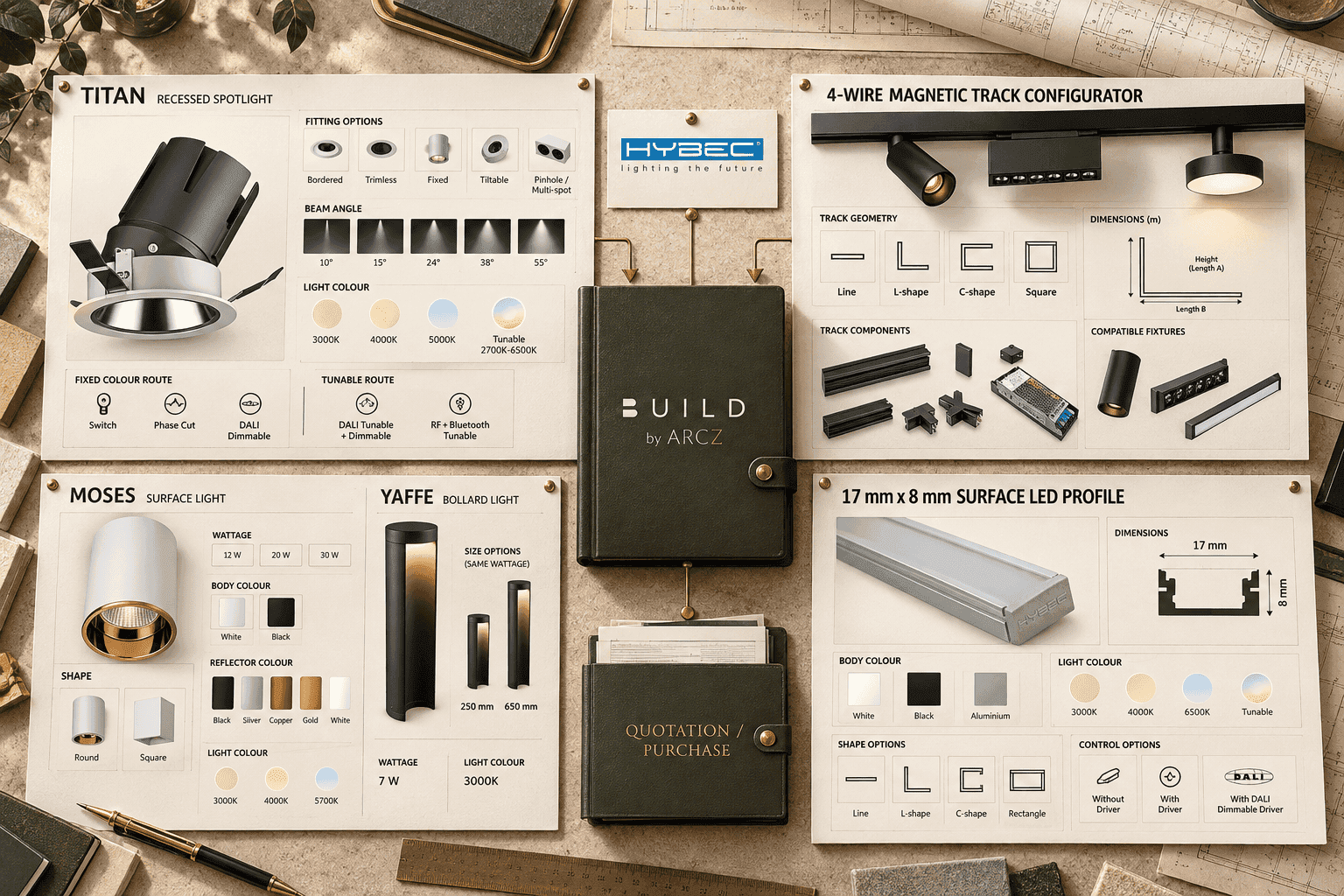
Yes. Many HYBEC products can be customised online on BUILD by ARCZ, but there is no single universal form. The live configurator changes with the product. A complex recessed spotlight can use compatibility rules between wattage, fitting, colour temperature and control; a magnetic-track system can be laid out by shape and populated with fixtures; a surface profile can be dimensioned by run; and a simple bollard may only need a size choice. After configuration, the current price updates, the selection can move to cart or a logged-in project quotation, and the order can continue into payment and procurement. This guide uses five current live examples to show the difference.
At a glance
-
Start at HYBEC on BUILD by ARCZ or a current populated HYBEC category, then open the exact product or system you want to specify.
-
Read category-card capability cues before opening a product, but treat the live configurator as the final source for the exact options available in a specific configuration.
-
BUILD does not give every product the same controls. TITAN, magnetic track, MOSES, the 17 mm x 8 mm surface profile and YAFFE each use a different level of configuration.
-
Earlier choices can change later choices. On TITAN, a fixed 4000K route exposes a different control set from a tunable 2700K-6500K route in the demonstrated 15 W configuration.
-
The magnetic-track configurator goes beyond product variants: it converts dimensions into track profiles, lets users place compatible luminaires into available track space, and generates the component list.
-
Displayed product pricing is currently inclusive of GST. Any applicable discount is calculated at the final stage of the order flow.
-
Use cart for a straightforward order. Log in by phone number and OTP when the order needs a project quotation organised by floor and area.
-
Recheck the live product page before purchase or publication because controls, compatibility, prices and commercial terms are dynamic.
Scope: what this guide proves, and what it does not
This guide is for project teams that already know they are considering HYBEC architectural lighting and want to understand what online configuration and purchase actually mean on BUILD by ARCZ. The examples were reviewed from the live BUILD interface. HYBEC remains the lighting product brand; BUILD by ARCZ is the specification, customisation, quotation, procurement and transaction infrastructure around the category. ARCZ does not own or manufacture HYBEC.
The five examples are intentionally different. Their controls must not be mixed. A colour, driver, beam angle, track fixture or size shown for one product is not evidence that the same option exists on another. The live product page and its current configuration logic are the governing source for the product in front of you.
The core rule: customisation is product-specific
The strongest point of BUILD is not that every light has a long list of choices. It is that the configuration path can reflect the physical and technical structure of the selected product. Some products need only one decision. Others need compatibility logic, geometry, component planning or a final bill of materials. The right question is therefore not "how many options does BUILD show?" It is "does BUILD expose the options that genuinely apply to this product and this configuration?"
That distinction is visible before the product page as well. On the current Ceiling Recessed COB category, product cards can show the series at lower left, a Tunable capability mark at upper left where applicable, and control capability icons such as DALI, Phase Cut or RF + Bluetooth at lower right. Switch is not shown as a separate card icon because it is the default route across the fixtures. These card-level cues are useful for screening, but they do not mean every variant of that product supports every displayed capability.
Five live examples of how HYBEC customisation changes by product
Example 1: TITAN shows conditional compatibility, not a static option list
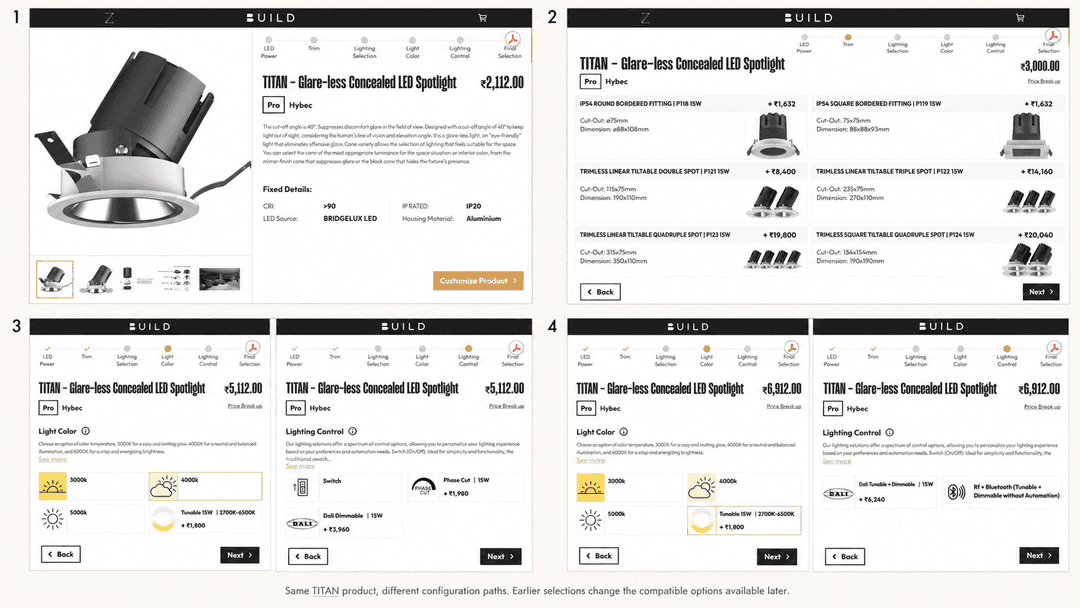
The TITAN - Glare-less Concealed LED Spotlight is the clearest example of dependency-driven configuration. Its current sequence runs through LED Power, Trim, Lighting Selection, Light Color, Lighting Control and Final Selection. The fitting stage itself can expose many compatible trim and fitting forms, while the lighting-selection stage can include reflector colour, body colour and beam angle. The important point is what happens later: the available control route changes when an earlier lighting choice changes.
In the demonstrated 15 W path, selecting a fixed 4000K light colour exposes control choices that include Switch, Phase Cut and DALI Dimmable. When the configuration is changed to the Tunable 2700K-6500K option, the control choices change to tunable-compatible routes, including DALI Tunable + Dimmable and RF + Bluetooth tunable/dimmable control. BUILD is therefore not offering one universal checklist. It is using earlier selections to determine what remains compatible downstream.
The final-selection screen then consolidates the configured wattage, fitting, beam angle, reflector colour, body colour, light colour and lighting control before the product is added to cart or project. This is the key lesson from TITAN: a capability badge on the category card tells you what may be possible somewhere in the product family, while the live configurator resolves what is possible for the exact configuration you are building.
Example 2: the 4-Wire Magnetic Track configurator builds a system, not just a product variant
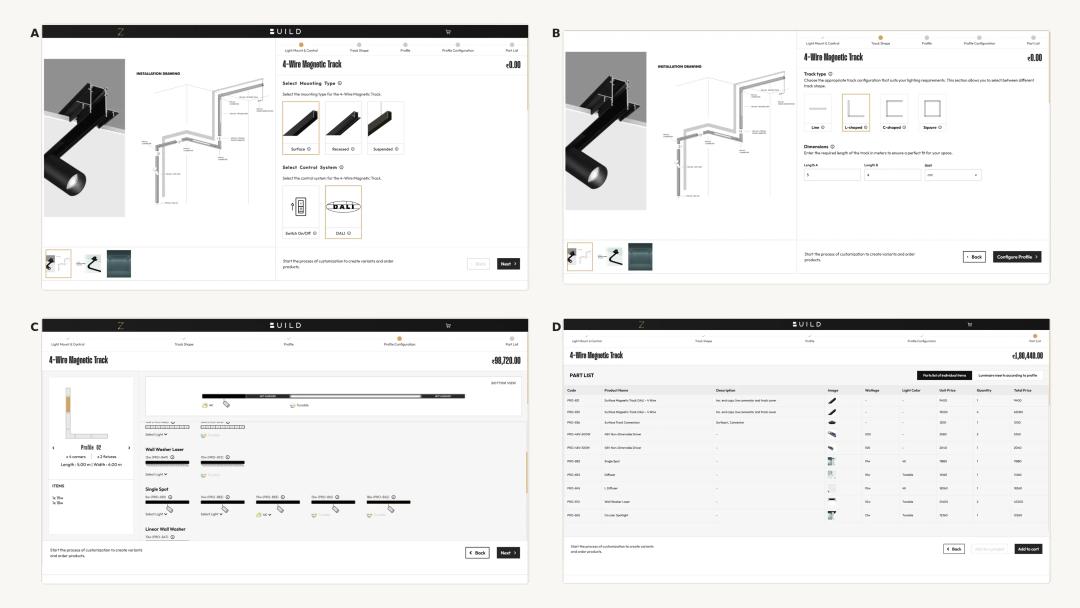
The dedicated configurator launched from the 48V Magnetic Track - DALI category works differently because the user is configuring an assembly. The current workflow is Light Mount & Control, Track Shape, Profile, Profile Configuration and Part List. Users first choose the mounting type, such as Surface, Recessed or Suspended, and the control system. Switch On/Off and DALI are separate routes, and the compatible track-product selection can differ between them.
The next step defines the geometry. The configurator currently offers Line, L-shaped, C-shaped and Square layouts, with the dimension fields changing according to the selected shape. The user enters the required lengths numerically. The profile overview then translates that geometry into a combination of standard 1 m and 2 m track sections. The track itself can be cut to the required final size, while the configurator rounds the requirement to the nearest metre for its component planning.
At this stage the track is still empty. In Profile Configuration, the user decides which compatible luminaires should occupy which track sections. Fixture families can include diffusers, laser modules, wall-washer variants, spots, hanging lights and other compatible inserts shown by the current system. Each fixture can expose product details through its information control, and light colour is selected from the choices actually offered by that fixture, for example 3K, 4K, 6K or a tunable variant where supported.
Placement is not purely visual. As a fixture is dragged into a profile, its physical footprint consumes available track length. That helps stop the layout from being overfilled with more fixtures than the selected track space can accommodate. Mixed compatible fixtures can be used across different profiles, and the running system price updates as the configuration grows.
When the layout is complete, BUILD generates a Part List containing the required track sections, connectors, drivers and selected luminaires with quantities and pricing. A second view, Luminaire inserts according to profile, preserves which light belongs on which track segment. That profile-specific placement record is useful later during installation because the purchased parts remain tied back to the configured layout.
Example 3: MOSES shows a simpler fixture workflow
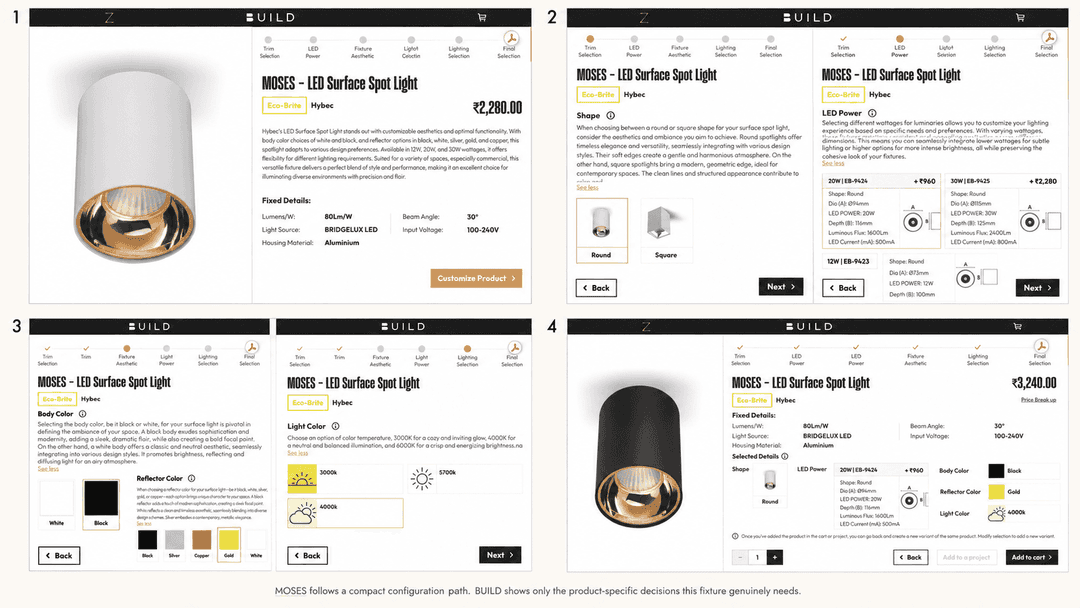
The MOSES - LED Surface Spot Light is deliberately simpler. Its current workflow is Trim Selection, LED Power, Fixture Aesthetic, Lighting Selection and Final Selection. The available decisions include Round or Square shape, 12 W, 20 W or 30 W power, White or Black body colour, Black, Silver, Copper, Gold or White reflector colour, and 3000K, 4000K or 5700K light colour.
This is useful evidence because it shows that a shorter configurator is not a reduced version of TITAN. It is the correct amount of configuration for this product. In the example reviewed, a Round 20 W fixture was combined with a Black body, Gold reflector and 4000K light colour, and the final selection brought those choices together before cart or project. No separate lighting-control step is exposed in this MOSES path, so the article should not invent one.
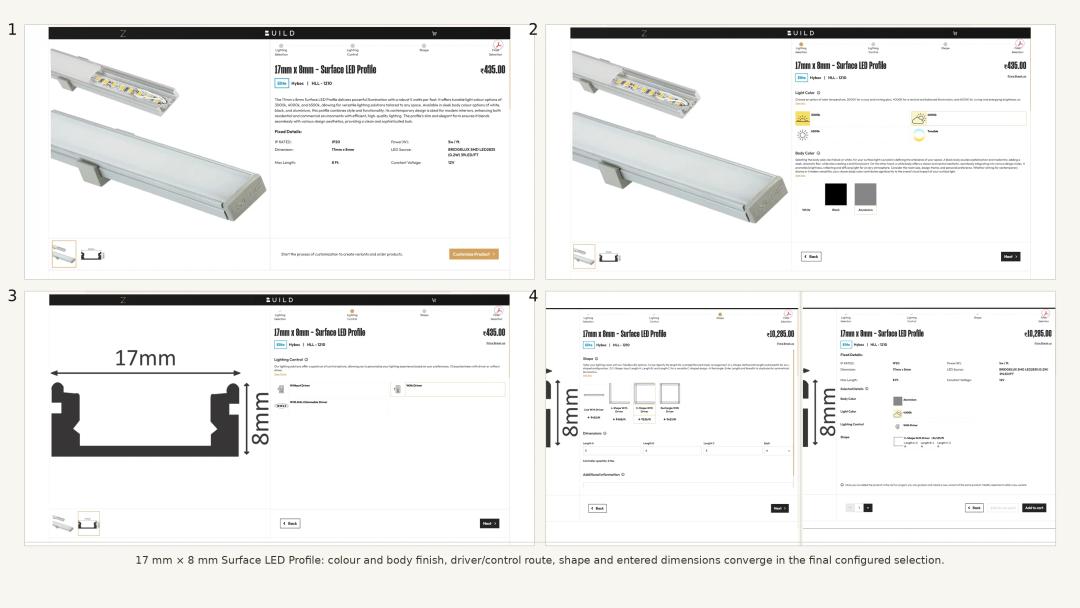
Example 4: the 17 mm x 8 mm Surface LED Profile turns dimensions into a purchasable run
The 17 mm x 8 mm - Surface LED Profile uses a geometry-led flow that is simpler than magnetic track but more spatial than a single fixture. The current sequence is Lighting Selection, Lighting Control, Shape and Final Selection. Its live options include 3000K, 4000K, 6500K or Tunable light colour; White, Black or Aluminium body colour; and control/driver routes shown as Without Driver, With Driver and With DALI Dimmable Driver.
The Shape stage currently offers Line, L-shape, C-shape and Rectangle forms. The required dimension fields change with the geometry. A line needs one run; an L-shape uses two; a C-shape uses three; and the closed form uses the lengths needed to define the layout. In the reviewed With Driver example, the C-shape was entered as 5 ft, 4 ft and 5 ft, and the platform showed the resulting price and controller quantity before Final Selection.
The principle is similar to the magnetic-track example, but the product is different. BUILD is not asking the user to drag fixtures into a track. It is converting a linear lighting requirement, including colour, finish, driver/control choice and dimensions, into a configured profile order.
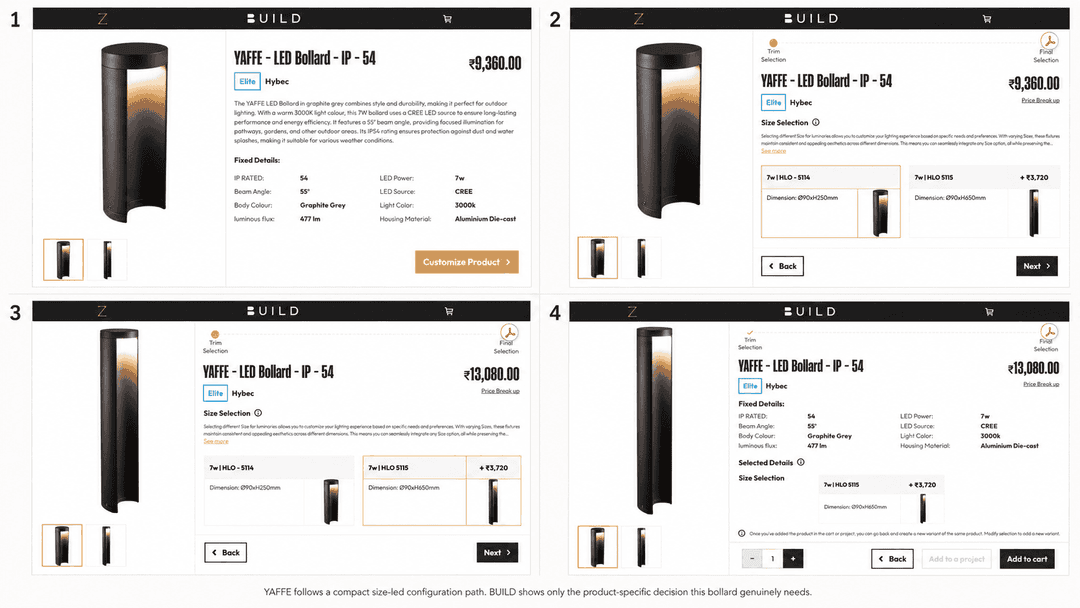
Example 5: YAFFE proves that even a one-step configurator can solve a real purchase decision
The YAFFE - LED Bollard - IP - 54 has a very short configuration path because most of its specification is fixed. The reviewed product is listed with 7 W power, 3000K light colour and the other fixed product details shown on its page. The actual selectable decision is size.
That size choice matters. Two current YAFFE variants share the same 7 W wattage and 90 mm diameter, but their heights differ: one is 250 mm high and the other is 650 mm high. Selecting the taller version changes the product image and price before Final Selection. This example prevents a common specification mistake: wattage alone does not define the physical product. Two fixtures can use the same power while serving very different dimensional requirements.
What the five examples reveal about BUILD
-
Conditional luminaire logic: TITAN changes downstream controls according to earlier technical choices.
-
System configuration: 4-Wire Magnetic Track combines mounting, control, geometry, track sections, fixture placement, accessories and final parts.
-
Straightforward fixture personalisation: MOSES exposes only the shape, power, finish and light-colour decisions relevant to that fixture.
-
Dimension-led linear configuration: the 17 mm x 8 mm profile converts selected geometry and run lengths into a priced configuration.
-
Single-decision variant selection: YAFFE keeps fixed specifications fixed and asks only for the size choice that actually varies.
Together, these examples show why BUILD should not be described as a generic marketplace. The transactional distinction is not simply that products can be added to a cart. The platform can carry product-specific configuration logic into pricing, quotation and procurement without flattening every HYBEC product into the same ecommerce template.
How pricing behaves during customisation
The live interface shows pricing alongside the product or system as selections are made. In the examples above, changing wattage, fitting, control, size, geometry or the number of track fixtures can change the displayed total where that choice carries a different price. The article should not preserve one screenshot price as a permanent product price. Pricing is dynamic and must be checked on the live product page or final quotation at the time of purchase.
BUILD currently presents product prices inclusive of GST. Any applicable discount is calculated at the final stage of the order flow. For project decisions, the safest commercial record is the final configured cart or project quotation, not an old catalogue screenshot.
Add to cart or add to a project quotation?
After Final Selection, the configured product or system can move into one of two practical routes. For a straightforward order, use Add to cart. For a project that needs room-by-room or floor-by-floor organisation, log in with a phone number and OTP and use Add to project, which feeds the project quotation workflow.
Cart route
The cart acts as the consolidated product list for a simple order. It is the direct route when the buyer already knows what is required and does not need the order split across project locations.
Project quotation route
The logged-in project route is built for structured specification. Users can create multiple floors and areas, then assign each customised product to the floor and area where it belongs. That keeps product selection connected to project location instead of turning a multi-room lighting package into one undifferentiated list. The same logic is especially useful for track and profile systems because the configured assembly can remain associated with the area for which it was designed.
How purchasing works after configuration
Once the cart or project quotation is ready, the order can continue through BUILD by ARCZ. Current payment routes include online and offline methods. Online payment can include card and NEFT or bank-transfer routes; offline coordination can include cheque or cash where applicable to the order.
Current order terms can support either full payment or a 50% advance for applicable orders. The advance allows the material-preparation process to begin, with the remaining amount paid once the material is ready and before dispatch. Material is dispatched only after 100% payment is complete. After payment, the customer receives timeline and order-status communication through the platform and WhatsApp, with direct team support available for order handling.
When self-selection is enough, and when to use Lighting Consultation
Self-selection works best when the user already understands the required product, quantity and configuration. The five examples in this guide are built for that decision stage: they help a user turn a known lighting requirement into the exact live configuration the platform supports.
Use the Lighting Consultation pathway when the project still needs help deciding what lighting should be used, where it should be placed, or how the overall lighting package should be coordinated. Consultation can produce the project-level quotation and presentation material instead of requiring the client or architect to build every selection independently.
Where the online workflow works well, and where to be careful
BUILD is particularly useful when the product page can translate a known requirement into a clear selectable path. TITAN benefits from compatibility logic; magnetic track benefits from layout and component planning; the surface profile benefits from dimensional input; and YAFFE benefits from keeping one simple size choice separate from fixed specifications.
The limits are just as important. Do not assume a product has a control because another HYBEC product has it. Do not assume a category-card capability icon applies to every wattage or variant. Do not use a price from an old screenshot as a current quote. And do not use the magnetic-track logic to infer behaviour for non-track products. Product controls, compatibility and commercial terms must be rechecked on the live page before ordering and before every substantive update to this article.
Common mistakes to avoid
-
Treating all HYBEC products as if they share one configurator.
-
Reading a category-card capability icon as proof that every configuration supports that control.
-
Presenting fixed technical details as user-selectable controls.
-
Ignoring dependency logic, such as assuming fixed 4000K and tunable light colour expose the same control choices on TITAN.
-
Overfilling a magnetic track by thinking of fixture placement as decorative rather than space-aware.
-
Specifying a linear profile by quantity alone when the actual order depends on geometry and run lengths.
-
Assuming equal wattage means equal physical size, which the two 7 W YAFFE variants disprove.
-
Copying an old screenshot price into a new specification or article without checking the current live total.
Frequently asked questions
Can HYBEC lights be customised online?
Yes, when the selected live product or system exposes customisation controls. The available controls are product-specific. Some products have deep compatibility logic, some use geometry or system configuration, and some may expose only one or two choices.
Does every HYBEC light have the same customisation options?
No. TITAN, MOSES, the magnetic-track system, the 17 mm x 8 mm profile and YAFFE all demonstrate different configuration paths. Use only the controls shown by the current product page you are actually buying.
Why do TITAN control options change after selecting a light colour?
Because the demonstrated configuration uses compatibility logic. In the reviewed 15 W path, a fixed 4000K selection exposes a different control set from the Tunable 2700K-6500K selection. The exact available controls are determined by the current configuration, not by one universal control menu.
Can I configure a complete magnetic-track layout online?
Yes, for the current 4-Wire Magnetic Track configurator shown in this guide. The user can choose mounting and control, define the shape and dimensions, build the profiles, place compatible fixtures, and generate the parts and profile-specific luminaire lists before moving to cart or project.
Can I create a quotation by floor and area?
Yes. After phone-number-and-OTP login, the project workflow can organise customised products across multiple floors and areas. That route is more useful than a simple cart when the lighting package needs to stay tied to project spaces.
Are displayed BUILD prices inclusive of GST?
Yes, under the current BUILD commercial setup. Any applicable discount is calculated at the final stage. Prices are dynamic, so the live configured product or final quotation should be treated as the current commercial source.
Can I pay an advance instead of the full amount immediately?
Current order terms can support a 50% advance for applicable orders, with the balance paid after the material is ready and before dispatch. Full payment is also supported. Dispatch occurs only after 100% payment is complete.
What should I do if I do not know which HYBEC product or configuration is right?
Start with HYBEC on BUILD by ARCZ if you are comparing current categories. If the project needs help with fixture selection, layout or a coordinated multi-area lighting proposal, use Lighting Consultation instead of forcing a self-selection workflow.
Configure the product that is actually in front of you
The practical advantage of BUILD is not a promise that every HYBEC product can do everything. It is the opposite: the platform can keep the configuration tied to the product or system being specified. Open the current product, follow the choices it genuinely exposes, review the final configuration and price, then use cart or a project quotation according to the complexity of the order.
Explore HYBEC on BUILD by ARCZ to open the current catalogue and continue into the live product and system configurators.
Sources and update record
-
HYBEC catalogue hub on BUILD by ARCZ - current catalogue entry point, checked 3 October 2026.
-
TITAN - Glare-less Concealed LED Spotlight - conditional product-configuration example, checked from the live interface and supplied screenshots on 3 October 2026.
-
48V Magnetic Track - DALI category - dedicated system-configurator entry point and magnetic-track example, checked from the live interface and supplied screenshots on 3 October 2026.
-
MOSES - LED Surface Spot Light - straightforward fixture-personalisation example, checked from the live interface and supplied screenshots on 3 October 2026.
-
17 mm x 8 mm - Surface LED Profile - dimension-led linear-profile example, checked from the live interface and supplied screenshots on 3 October 2026.
-
YAFFE - LED Bollard - IP - 54 - size-selection example, checked from the live interface. and supplied screenshots on 3 October 2026.
-
BUILD by ARCZ - commercial specification and procurement route.
-
Pricing, GST, discount, quotation, payment and post-order workflow - direct ARCZ product-owner verification in the project evidence record.